
Are you one of those who wanted to create Blog, that too Easily & Free? & want to make Money. If yes, you are at right place. We will be discussing here “How To Create A Free Blog On Blogger.Com” By Step-By-Step Guide,
As Blogging Industry is Growing Fast & Wide, Blogging is in Top Money Making Start-Ups In 2019. & I am sure you might be thinking to Blog & express your views & publish your articles to the world. and you don’t want to invest in domain & all hosting like stuff & wanna start small. So there’s Blogger.com which help us to create us Free Blogs, Easily & Hustle Free & we will be here discussing the steps to create it, Let’s Get Started.
Sign In To Blogger
You can easily Sign-In to Blogger by linking your existing Gmail Account. & after signing in Click on the “New Blog” option available in left down corner, As shown in the picture.
:max_bytes(150000):strip_icc()/blogger1-572039f55f9b58857db25919.png)
- After that you will be asked to enter the Title Of your Blog, Use appropriate title that matches the type of content you are going to put in.
- The next step is “Address”, It actually means the Domain Name of your Blog. Use the name that matches your content & I recommend you to keep the domain name which is highly searched on internet or you can take help of any Free SEO Tools, so that your content can rank up the search engine.
- You must seeing the Templates Option Below, you can choose the template that you like.
- Then Click on “Create Blog”.
Your Free Blog Is Created, Let’s Check Out Some Tools”
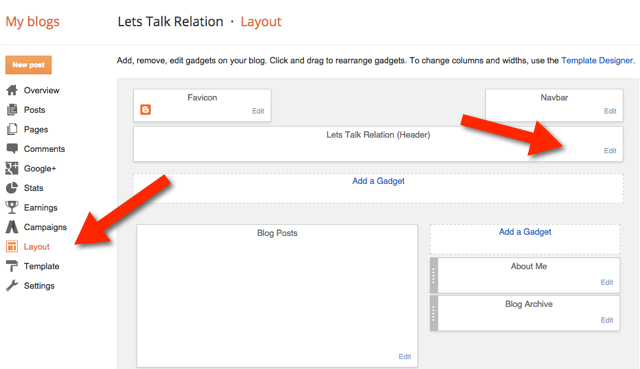
Now you have to click on Layout Tab located on left side, as shown in the above picture. You will be seeing the following things there:
- Favicon – A favicon also known as a shortcut icon, website icon, tab icon, URL icon, or bookmark icon, is a file containing one or more small icons, associated with a particular website or web page.
- Navbar – A navigation bar (or Navbar) is a section of a graphical user interface intended to aid visitors in accessing information.
- About Me – You can add a short description about your blog & yourself.
Your Blog is now ready, You can make further changes by going to the “Setting” Option. you can also modify your templates by click on “Templates” & see your Traffic Sources,Audience & other statistical information at “Stats”.
“You can also Turn your passion into profit. yes I am talking about Adsense. you can click on “Earnings” Option to see the Adsense menu“. as shown below,
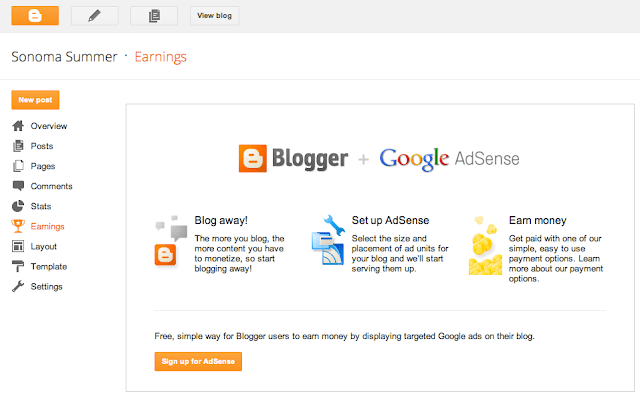
You can Sign Up for your AdSense account simply from your Gmail Account & Place Ads On your blog to earn Revenue. Let us check out an example of user’s Adsense earning.

Thats’s All For Blog Basics, Hope This Will Help You Create Your BlogSpot. 🙂
 Online Business Addict