

As you may know, you can earn upto a lot of money from youtube and make it your full time profession. You just need to select a niche and work hard on it. The following are the top 10 most successful youtubers with their net worth:
- Ryan ToysReview – $22 million (at just 7 years old)
- Jake Paul – $21 million
- Dude Perfect – $20 million
- DanTDm – $18.5 million
- Jeffree Star – $18 million
- Markiplier – $17 million
- Vanoss Gaming – $17 million
- Jacksepticeye – $16 million
- Pewdiepie – $16 million
- Logan Paul – $15 million
Now that is a lot of money that can be pulled from youtube. Most of this money comes from advertisements that you may have seen on yotube. Here we will discuss how to link youtube with adsense and start earning:
APPLY FOR YOUTUBE PARTNER PROGRAM(YPP)
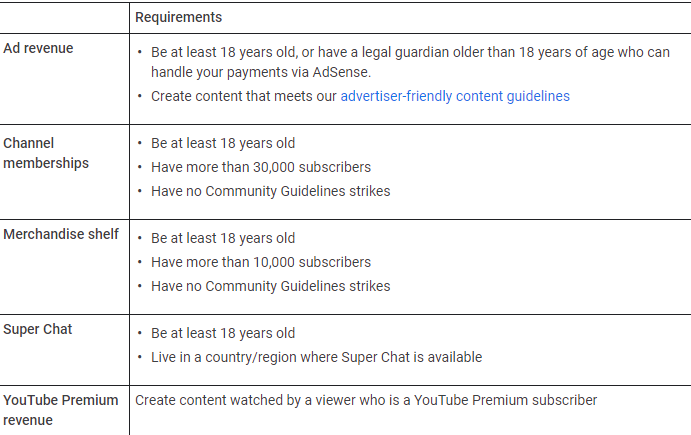
Now you will also need to associate an AdSense account:
1) There’s a section for “Guidelines and Information” on the page. Click the “How will I get paid?” FAQ there to expand the answer. On the answer text, click the “Associate an AdSense account” link then click the “Next” button at the bottom of the next page.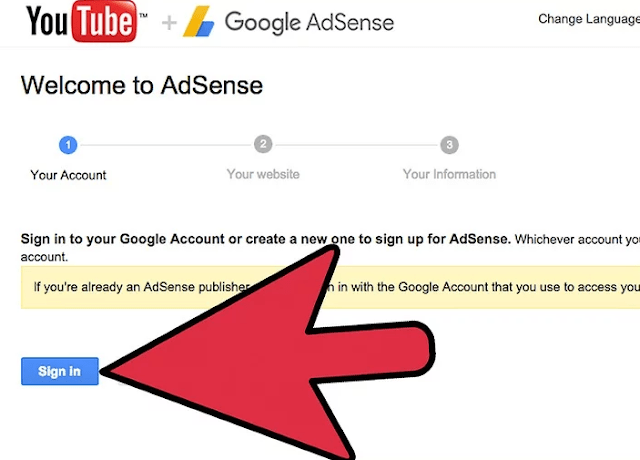
2) Next, enter your google account and the URL of your channel. Describe your content, fill in the details like cell number, street address etc and click on Accept Association button.
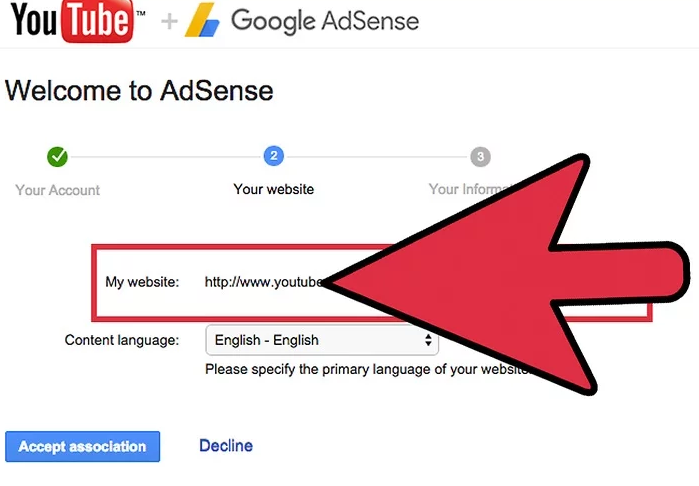
Your AdSense application will be reviewed by automated machines as well as employees, and you will receive an email once it’s confirmed. As long as your account is in good standing, you should have this approved.
It should take less than 24 hours but this is not guaranteed. Since a lot of applications are submitted for AdSense approval, it may take some time.
Once your application been approved, your AdSense account is now linked to your YouTube account, and you can now start earning money from your videos.
Since it undergoes automated as well as human verification, remember to post friendly content and post on consistent basis.
Your account may get demonetized if you are inactive for 6 months or more.
That’s All For YouTube Basics. Don’t Forget To Drop A Comment So We Can Improve & Produce More Quality Content.
 Online Business Addict